
Dolibarr modules — Documentation
Add-on modules for Dolibarr ERP/CRM published by INTECHSO: custom PDF templates, reference management, third party modification, and customer product returns.
Deploy each module under custom/module_name/ in your Dolibarr tree, then enable it from Home → Setup → Modules / Applications. Permissions are set per user or group under Users & groups → Permissions.
Modules and documentation
PdfDesign — Custom PDF templates
Professional, custom-branded PDF templates for invoices, proposals, orders, proformas, shipments and delivery notes, with colour configuration and multi-language support.
Read more →Refmodifier — Change references
Edit the internal reference (ref) on commercial and supplier documents and on agenda events, with rights per document type.
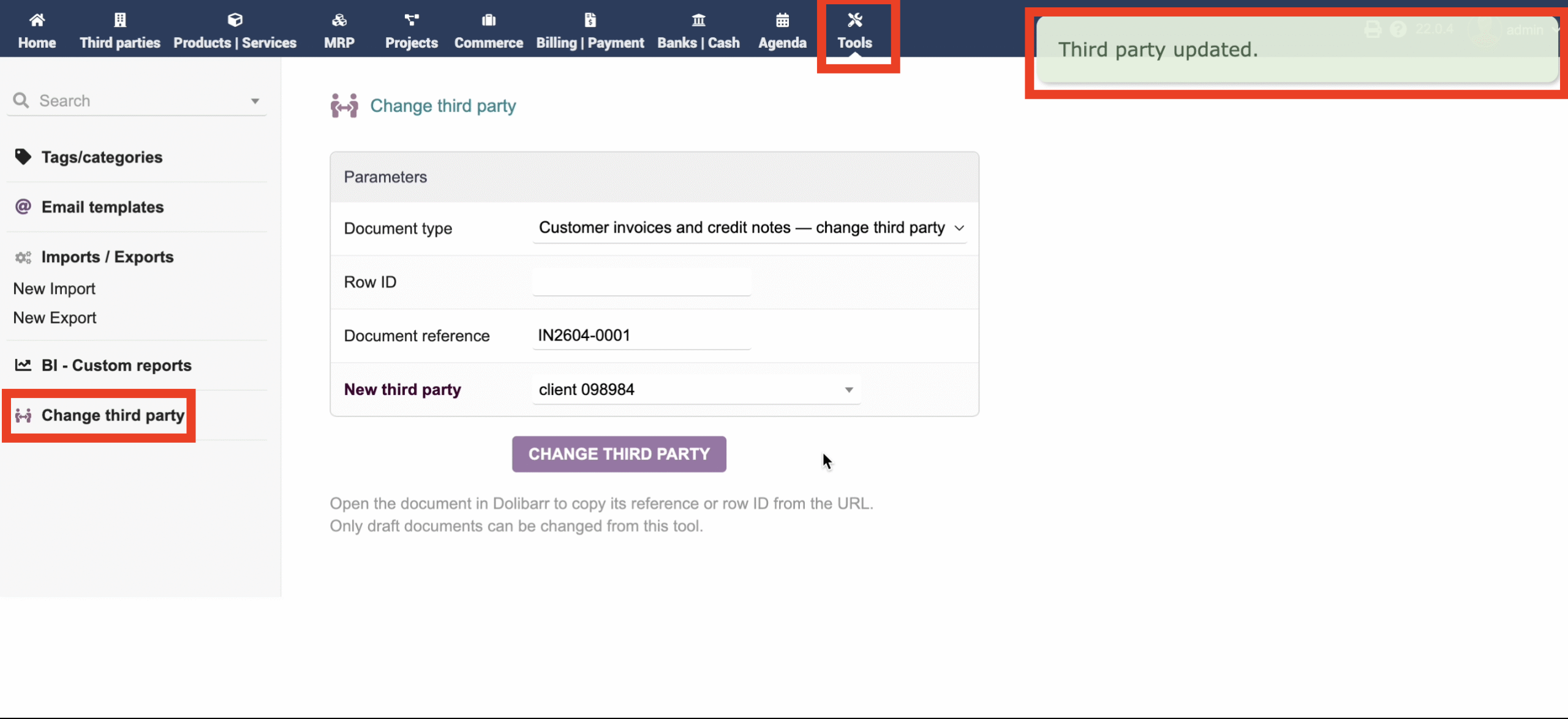
Thirdpartymodifier — Change third party
Change the linked third party (fk_soc) on draft documents for sales and purchases, with permissions per document type.
SmartReturn Pro — Product Returns & Credit Notes
Streamline customer product returns, manage RMA workflows, automatically update inventory stocks, and generate draft credit notes effortlessly.
Read more →KanbanPropale — Kanban Pipeline for Proposals
Visual pipeline management of commercial proposals with drag-and-drop, KPI dashboard, enriched cards, PDF preview, and multi-language support.
Read more →Dolibarr module: PdfDesign
UI label: PdfDesign — Custom PDF templates. Replaces default PDF layouts for 6 document types with professional, fully customisable templates, activated automatically on module enable.
Overview
PdfDesign provides a complete PDF template suite covering all major Dolibarr document types. Templates feature a modern, compact layout with colour configuration, a detailed info bar, payment and signature blocks, Number Words (amount in letters with centime support, multi-language), linked-object references, and extrafields display. All templates support page-break handling with a compact header on subsequent pages.
Document types covered
- Invoice (
pdf_intechso_facture) — customer invoices and credit notes - Proposal (
pdf_intechso_propale) — sales proposals / quotes - Order (
pdf_intechso_commande) — customer orders - Proforma (
pdf_intechso_proforma) — proforma invoices - Shipment (
pdf_intechso_expedition) — shipping / packing slips - Delivery (
pdf_intechso_delivery) — delivery notes
Template preview
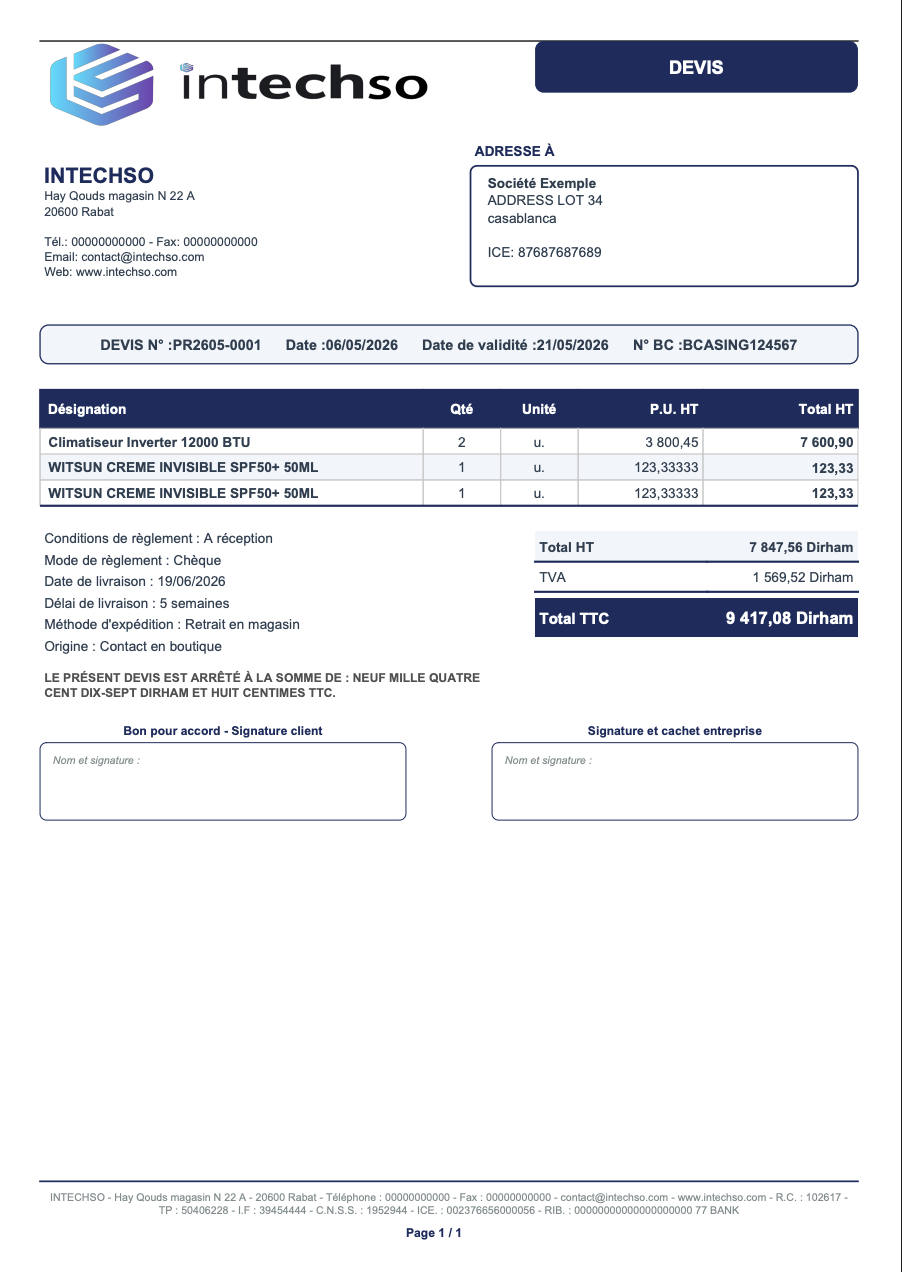
pdf_intechso_propale) — devis client avec conditions de paiement, délais, Number Words.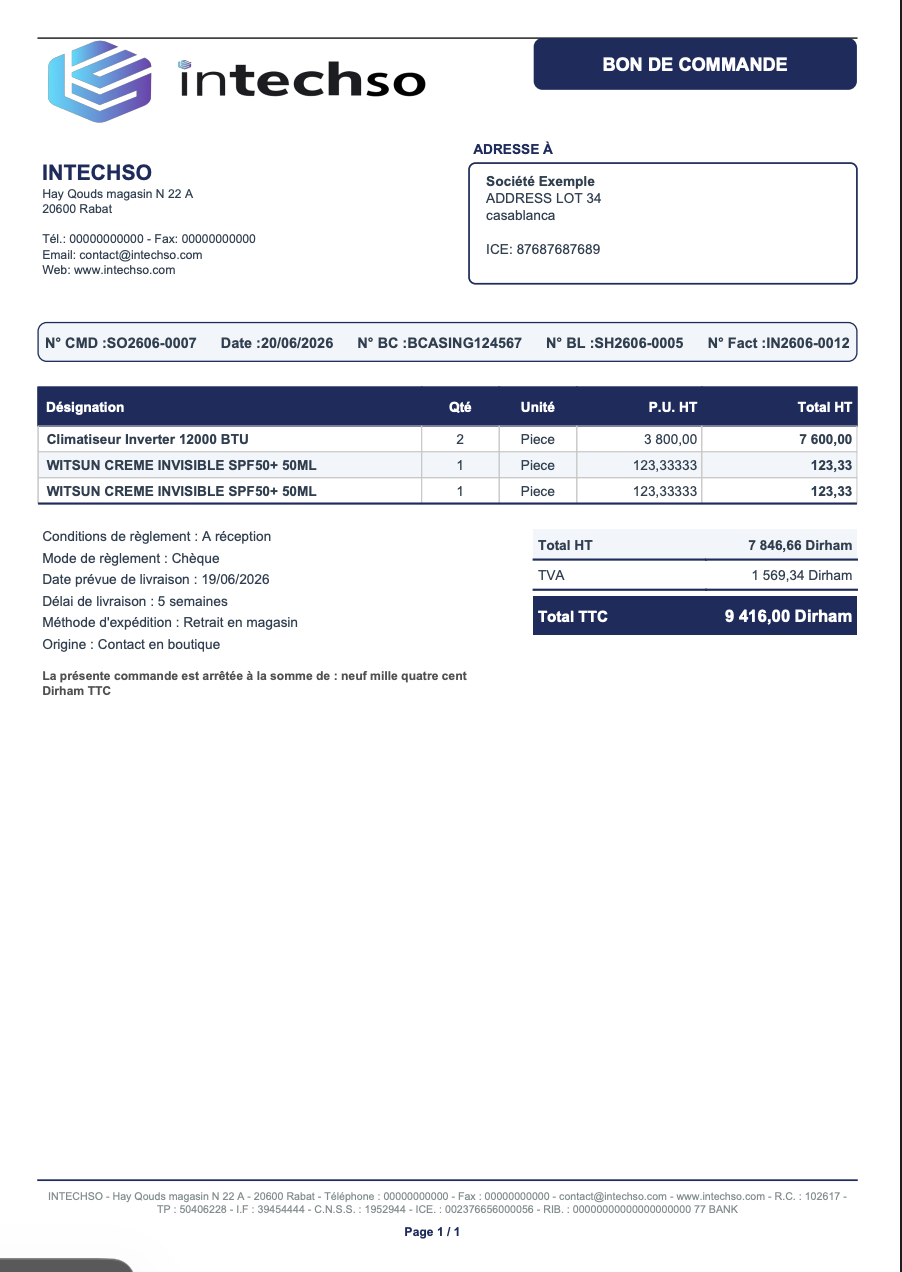
pdf_intechso_commande) — commande client avec objets liés, référence client, expédition.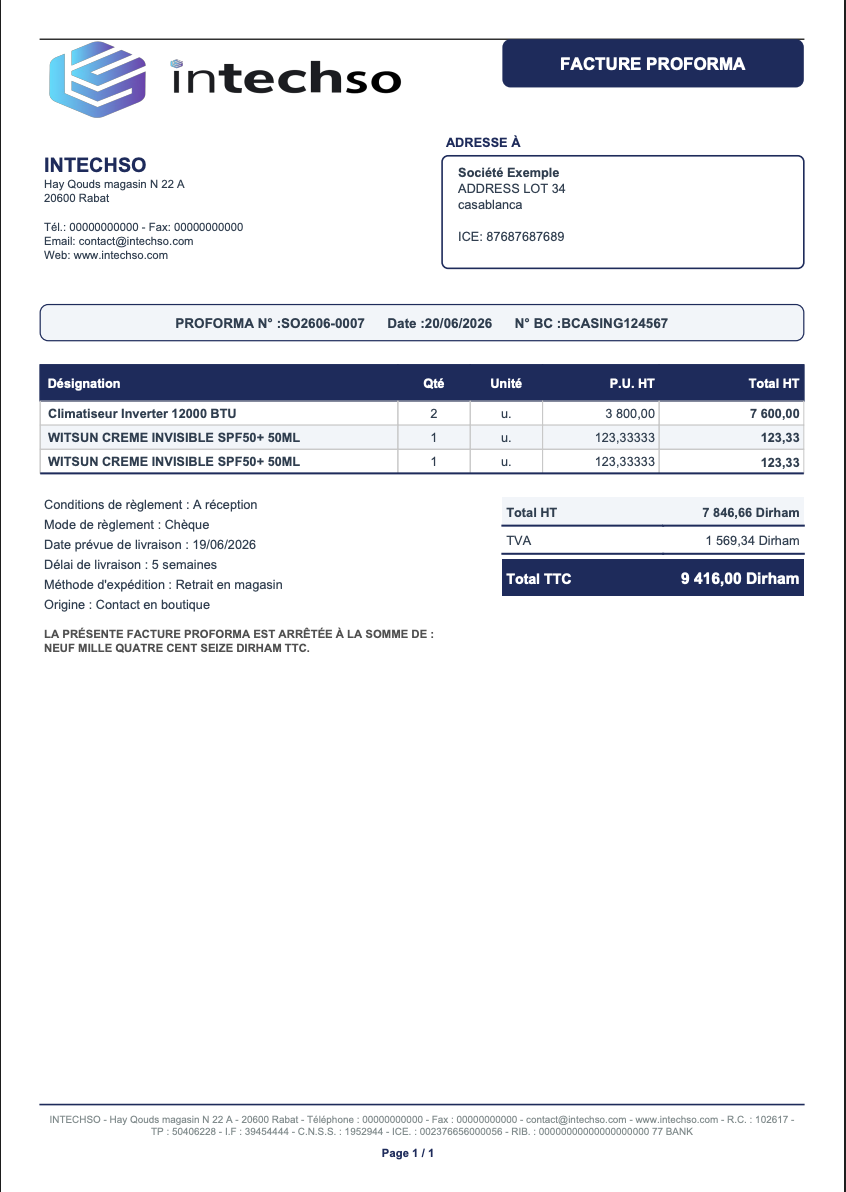
pdf_intechso_proforma) — facture proforma avec info de paiement and Number Words.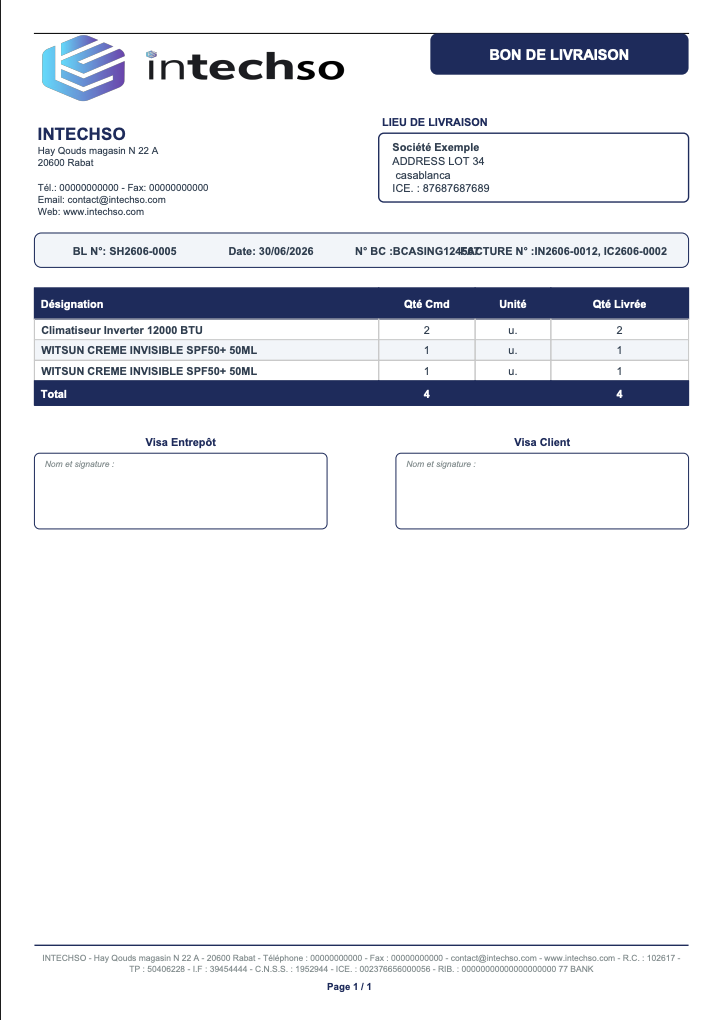
pdf_intechso_delivery) — bon de livraison avec quantités commandées / livrées, totaux.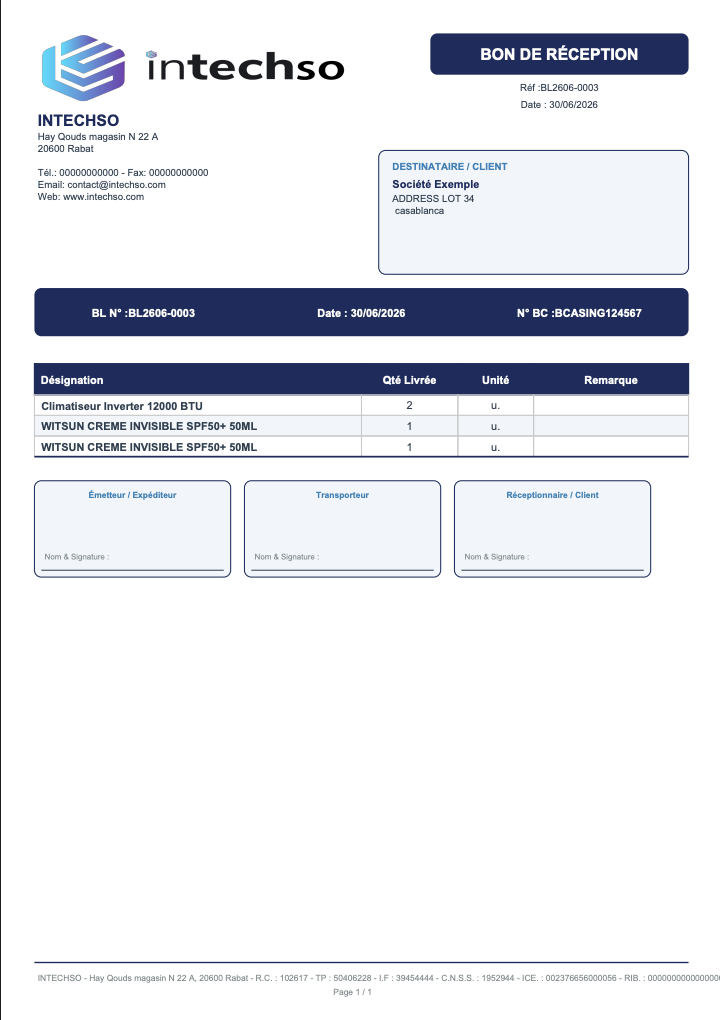
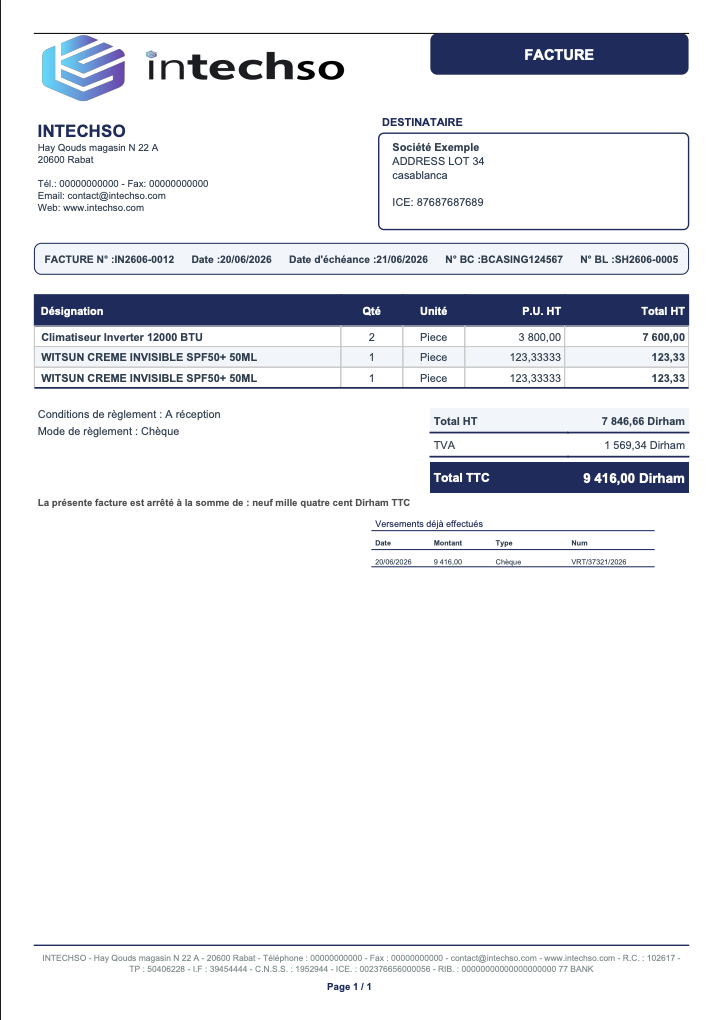
pdf_intechso_facture) — facture client avec barre d’infos compacte, Number Words, bloc paiements, bloc signature.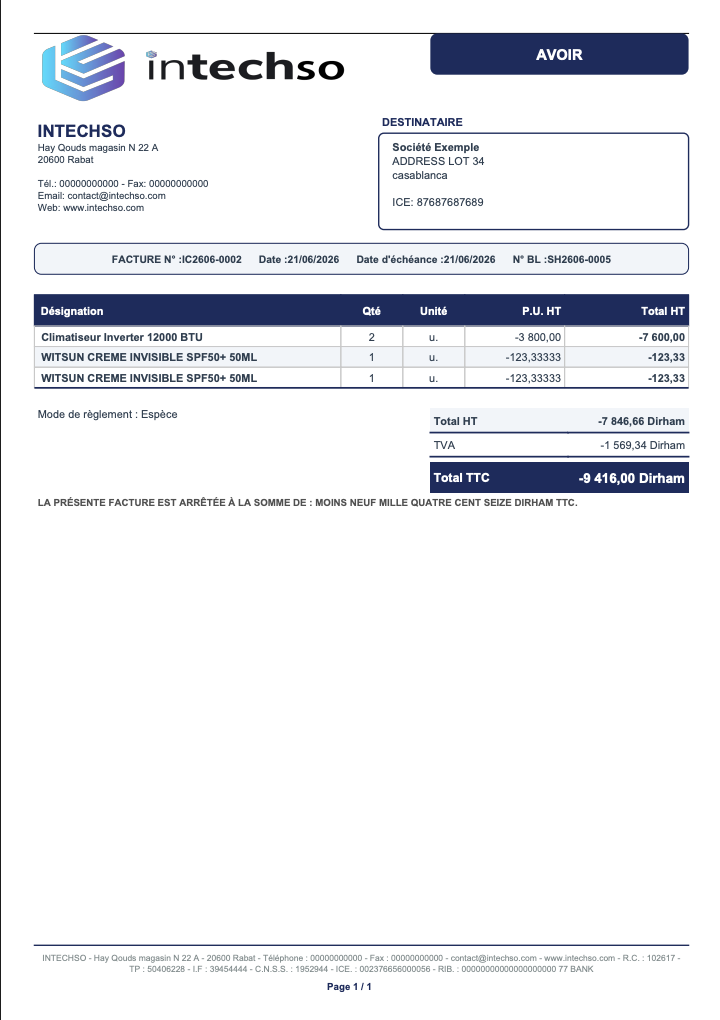

Main features
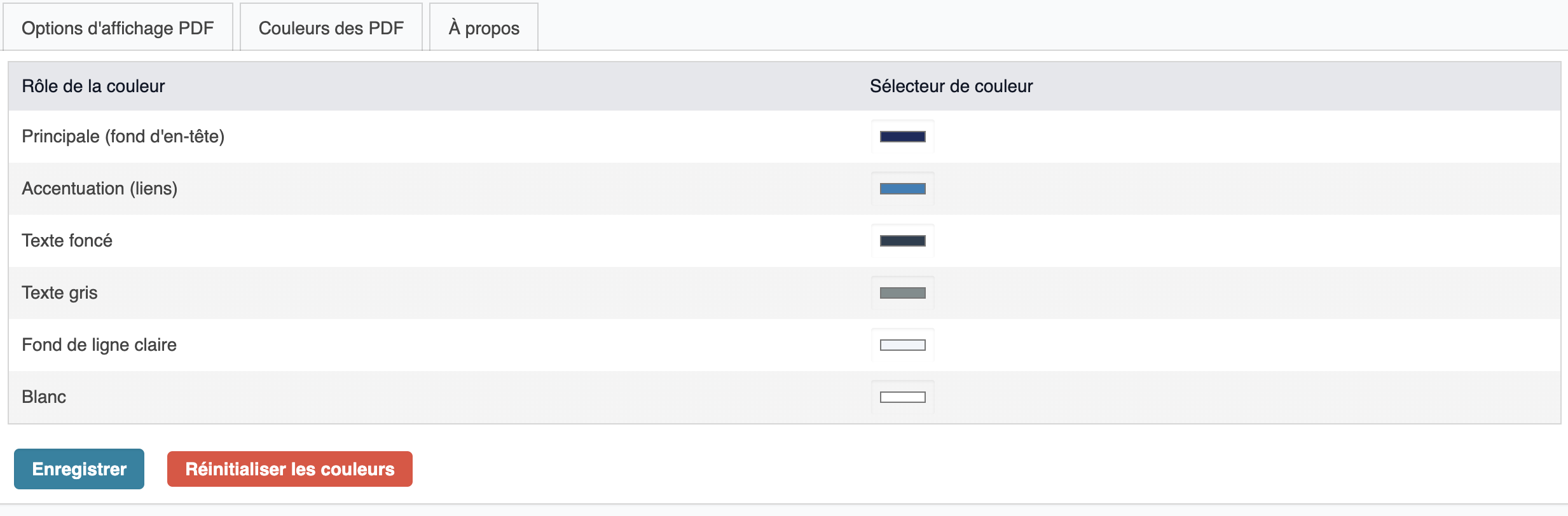
- Custom-branded PDF output: primary, accent, dark, gray, light background, white.
- Compact info bar: third-party name, document date, due date / availability, payment terms and mode.
- Product table with configurable columns: ref, description, quantity, unit, VAT, unit price, discounts, total.
- Number Words block: amount in letters with Hide option.
- Payments block (invoices): displays received payments on the PDF.
- Signature block with recipient and company signature lines.
- Totals block: configurable to show or hide totals/quantities on delivery notes.
- Extrafields display: custom fields from the document rendered on the PDF.
- Page-break handling: compact header on pages 2+; product table header redrawn.
- Admin setup page: colour picker, hide options.
- Multi-language: English, French, German, Spanish, Italian.
Installation
- Copy the module to
custom/pdfdesign/. - File permissions: read access to web server user.
- Enable the module under Home → Setup → Modules / Applications.
- The 6 PDF templates are automatically registered.
Video Tutorial
Dolibarr module: Refmodifier
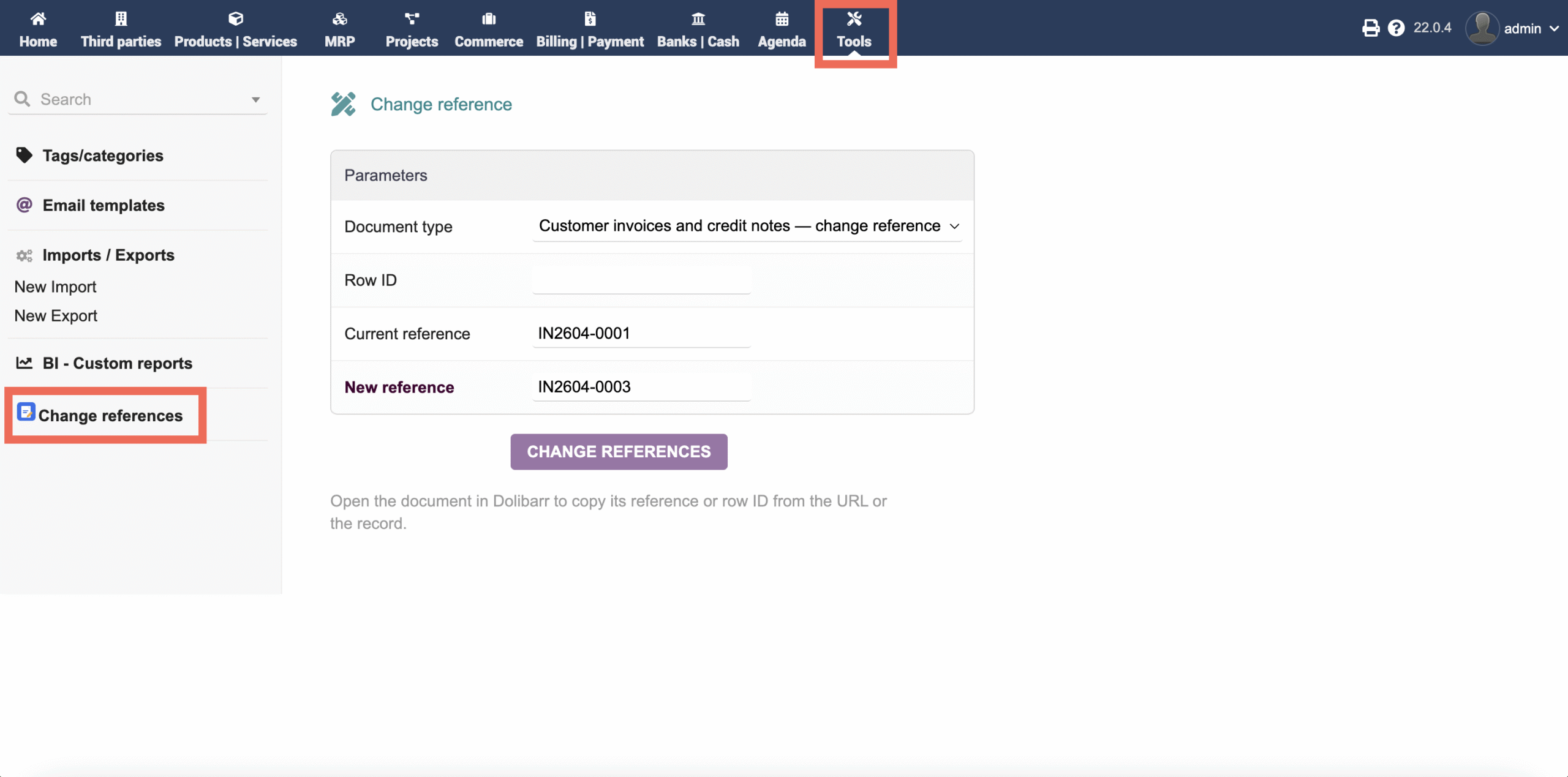
UI label: Change references. Lets you change internal references (ref) on commercial and supplier documents.
Overview
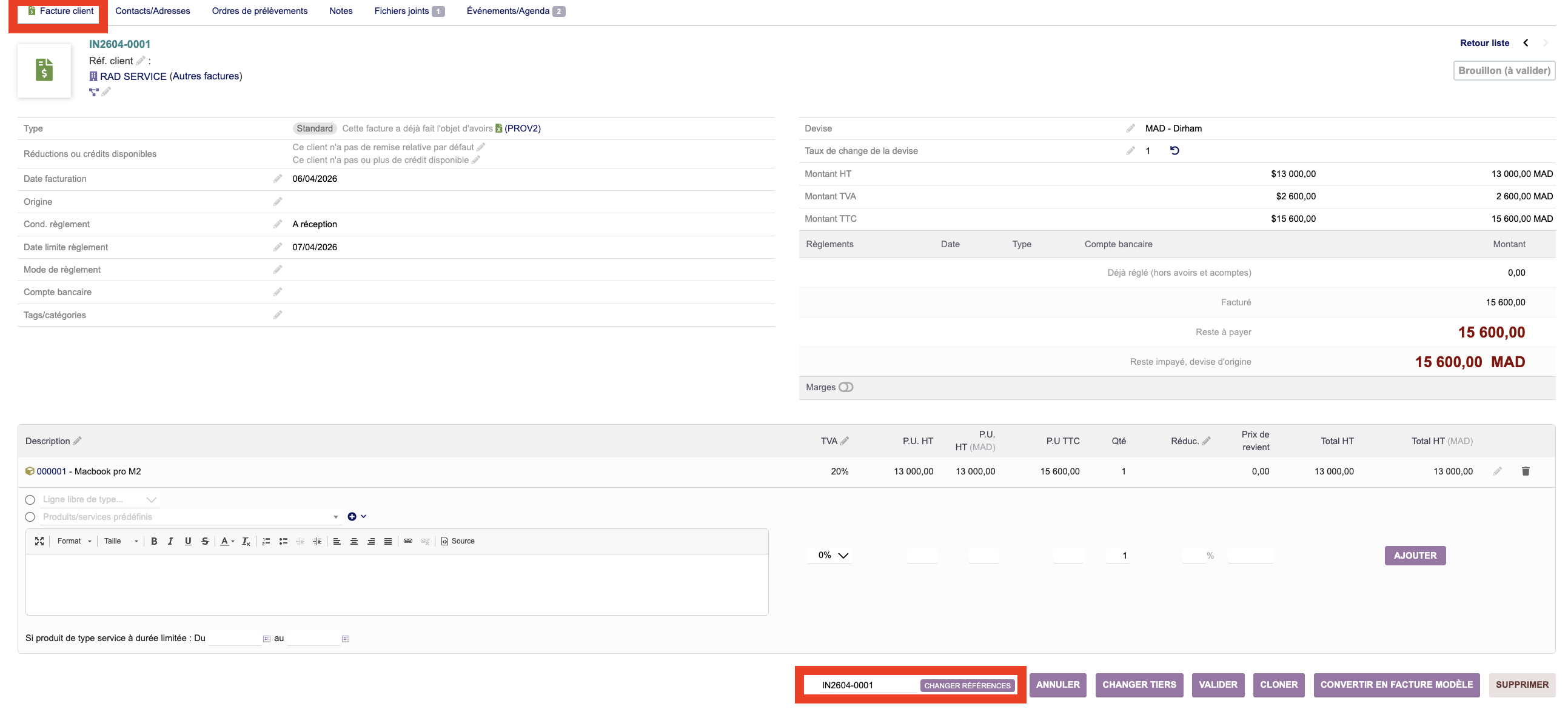
Refmodifier adds an action on record cards while the document is still draft and a Tools menu entry for authorized users.
Installation & Usage
Extract to custom/refmodifier/, activate via modules setup, and check settings under Home → Tools → Change references.
Dolibarr module: Thirdpartymodifier
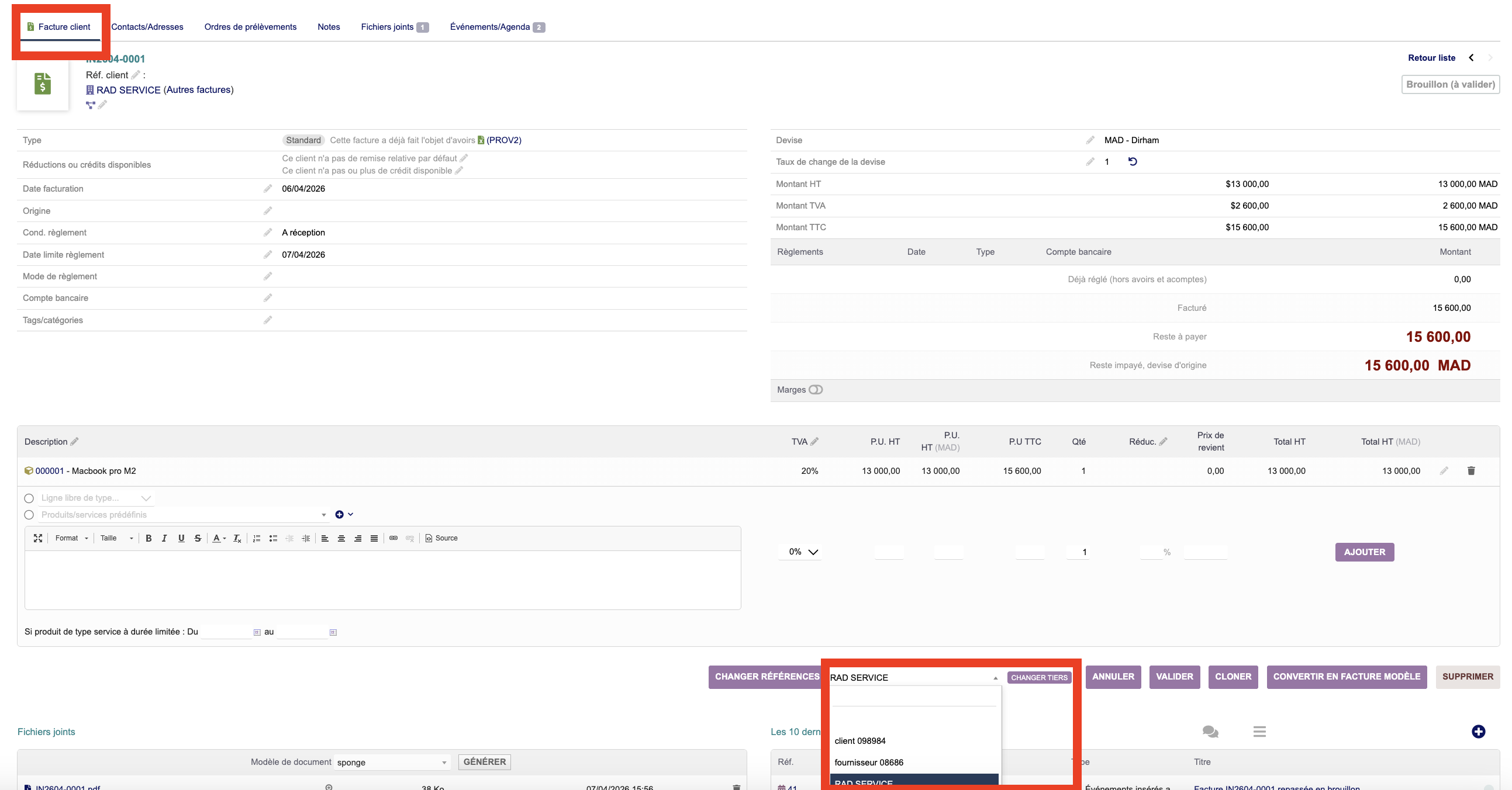
UI label: Change third party. Lets you change the linked third party (fk_soc) on draft documents.
Overview & Usage
Allows easy shifting of assigned customers/vendors on draft orders, proposals, or invoices before validation kicks in.
Dolibarr module: SmartReturn Pro v1.2.0
UI label: SmartReturn Pro. Provides advanced RMA tracking workflows, product return logs, stock reintegration, and direct credit note generation.
Overview
SmartReturn Pro simplifies the post-sales service cycle. It introduces a dedicated interface to process product returns directly from validated customer shipments or invoices.
1. Presentation
Customer returns management module for Dolibarr. Workflow:
| Field | Value |
|---|---|
| Version | 1.2.0 |
| Module ID | 468400 |
| Author | INTECHSO |
| Dolibarr | >= 16.0 && <= 24.0 |
| PHP | 7.1 – 8.4 |
2. Features
2.1 Returns Management
| Feature | Description |
|---|---|
| Manual creation | Return form with customer, reason, date, notes |
| Modification | Edit fields in Draft status |
| Validation | Move to Validated status (definitive reference) |
| Processing | Closure + stock movements |
| Cancellation | Cancelled return (VALIDATED/CLOSED only) |
| Deletion | Delete (DRAFT only) |
| Revert to draft | Revert from VALIDATED/CLOSED |
2.2 Return Lines
| Feature | Description |
|---|---|
| Add | Product, quantity, ex-tax price, warehouse |
| Edit | Edit quantity/price/description |
| Delete | Individual line deletion |
| Totals | Calculate ex-tax/VAT/ incl. tax totals with built-in discount |
2.3 Stock Management
| Feature | Description |
|---|---|
| Stock movement | Automatic decrement on validation |
| Stock check | Availability check before processing |
| Reversal | Reversibility on revert to draft or cancellation |
| Multi-warehouse | Warehouse management + batch tracking |
2.4 Credit Notes (Avoirs)
| Feature | Description |
|---|---|
| Create credit note | From validated/closed return |
| Copied lines | Products, quantities, ex-tax price |
| Object link | Return ↔ credit note binding |
2.5 PDF Generation
| Feature | Description |
|---|---|
| Draft PDF | « Not validated » watermark |
| Validated PDF | Definitive document |
| Design | Header, sender/recipient blocks, info bar, product table, signatures, footer |
| Visible columns | Ref, Description, Return qty, Ex-tax price, Ex-tax total |
| Hidden columns | Unit, Delivered qty (disabled v1.2.0) |
2.6 Dashboard
| Feature | Description |
|---|---|
| Financial KPIs | Ex-tax total, incl. tax total, number of returns |
| Statuses | Breakdown: Draft / Validated / Closed / Cancelled |
| Top products | Most returned products |
| Reason analysis | Breakdown by return reason |
2.7 Third-party Statistics
| Feature | Description |
|---|---|
| Customer tab | Return history per customer on customer card |
| Ex-tax/Incl. tax totals | Cumulative amounts |
| Top products | Most returned products per customer |
2.8 Configuration
| Feature | Description |
|---|---|
| Numbering | Mask RC{yy}{mm}-{0000} |
| PDF templates | Select default template |
| Return reasons | Configurable dictionary (10 by default) |
| Free text PDF | Customisable text |
| Weight/Volume | Display option |
3. Permissions
| Permission | Code | Description |
|---|---|---|
| Read | lire | View |
| Create | creer | Create / edit |
| Validate | valider | Validate a return |
| Process | traiter | Close (stock movements) |
| Delete | supprimer | Delete |
| Notes & Documents | notes_docs | Manage notes / documents |
| Configure | configurer | Administration |
| Create new | creer_nouveau | Manual creation |
4. Required modules
| Module | Status |
|---|---|
| Societe (Third parties) | Required |
| Stock | Required |
| Facture (Credit Notes) | Optional |
5. Database tables
| Table | Description |
|---|---|
llx_smartreturn | Return headers |
llx_smartreturndet | Return lines |
llx_c_smartreturn_reasons | Return reasons |
llx_document_model | PDF templates |
6. Multi-language support
| Language | Status |
|---|---|
| 🇬🇧 EN | ✅ OK |
| 🇫🇷 FR | ✅ OK |
| 🇩🇪 DE | ✅ OK |
| 🇪🇸 ES | ✅ OK |
| 🇮🇹 IT | ✅ OK |
7. Module files
| Directory | Content |
|---|---|
class/ | SmartReturn, SmartReturnLine, hooks |
core/modules/ | Descriptor, numbering, PDF |
admin/ | Config, reasons, extrafields |
langs/ | 5 languages (193 keys each) |
sql/ | Schema + data |
lib/ | Utilities |
img/ | Icons |
css/ | Badge styles |
8. v1.2.0 Fixes
| Category | Fix |
|---|---|
| Security | validate/process permissions separated from create |
| Security | Status guards on cancel and setDraft (VALIDATED/CLOSED only) |
| Register intechso_return template in llx_document_model on init | |
| Fallback pdfdesign_get_color() if addremise module absent | |
| Unit column hidden | |
| Delivered qty column hidden | |
| JS | Fix case mismatch ‘other’ → ‘OTHER’ (consistent with DB) |
| Languages | 19 missing keys added × 5 languages |
| Languages | Load errors/companies added in views |
| Admin | About page version → 1.2.0 |
| Admin | Dolibarr requirement → >= 16.0 && <= 24.0 |
| Admin | Expedition (Shipments) removed from required modules |
| Descriptions | Updated in all 5 languages |
| Cleanup | create_from_expedition.php removed (menu + file) |
| Include | Fix main.inc.php path in about.php |
9. Changelog
| Version | Date | Changes |
|---|---|---|
| 1.2.0 | 2026-07-10 | Security fixes, PDF fixes, languages, cleanup |
| 1.1.0 | 2026-07-09 | Initial version |
Dolibarr module: KanbanPropale
UI label: KanbanPropale — Kanban pipeline view for commercial proposals. Transform proposal management into a visual, fluid experience with drag-and-drop and real-time KPI tracking.
Overview
KanbanPropale transforms the management of commercial proposals into a visual, intuitive Kanban experience. Drag and drop proposals across pipeline columns with optimistic updates and automatic rollback. Built entirely with native Dolibarr tables — no schema modifications required.
Key Features
- 5-column pipeline: Draft, Sent, Signed, Refused, Cancelled
- HTML5 Drag-and-Drop with optimistic updates and automatic rollback
- 100% native integration using your existing Dolibarr tables
- KPI Dashboard: Pipeline TTC, Signed Revenue (month), Conversion Rate, Urgent Follow-ups
- Enriched cards with badges, HT/TTC amounts, key dates, payment conditions
- Modal PDF preview — instant document view without navigation
- Advanced filters: status, author, overdue, amount
- Call, email and follow-up notes logging directly on each proposal card
- 8 toggle switches to show/hide elements per team needs
- Dual security: module permissions + native Dolibarr rights + CSRF protection
- 5 languages: FR, EN, DE, ES, IT
Installation
- Copy the module to
custom/kanbanpropale/. - File permissions: read access to web server user.
- Enable the module under Home → Setup → Modules / Applications.
- The Kanban view is available from the Proposals menu.